
Enabling undercurls in tmux and Neovim
Undercurls provide subtle visual cues in terminals, drawing attention to important information. It has been on my wishlist for quite some time, as it wasn’t working out-of-the-box. After discovering Anurag Pramanik’s excellent guide on enabling undercurls, I decided to bite the bullet and have a go at it. This article builds upon Anurag’s work with additional optimizations and insights for a smoother experience.
Reading from stdin #
There’s no need to read and write to temporary files. We can configure tic to read from stdin instead, resulting in a smoother and more robust setup. Here’s the snippet I added to my .zprofile:
# Enable undercurl support in tmux
infocmp | sed '/smul=/a\
        Smulx=\\E[4:%p1%dm,
' | tic -x -

# Or as a one-liner
infocmp | awk '/smul=/ { print; print "        Smulx=\\E[4:%p1%dm,"; next } 1' | tic -x -
Colorful undercurls #
One of the exciting aspects of customization is the creative freedom it offers. While many applications use red undercurls to mark spelling mistakes, you might want to experiment with different colors for various use cases. Initially, I couldn’t change the color of undercurls inside Neovim. Following the guide closely, I realized I forgot to add these lines to my .tmux.conf:
# Enables undercurl support
set -as terminal-overrides ',*:Smulx=\E[4::%p1%dm'
set -as terminal-overrides ',*:Setulc=\E[58::2::%p1%{65536}%/%d::%p1%{256}%/%{255}%&%d::%p1%{255}%&%d%;m'
Then in Neovim, we can easily add a red undercurl for spelling mistakes:
vim.api.nvim_set_hl(0, "SpellingBad", { sp = "#ff0000" })Unneeded settings #
screen-256color #
The guide suggests using screen-256color as your terminal type in tmux. However, I found that using xterm-256color works just as well:
set -g default-terminal "xterm-256color"
set -a terminal-features 'xterm-256color:RGB'

# Otherwise colors are not rendered correctly running Neovim within tmux
set-option -ga terminal-overrides ",*:Tc"
Neovim configuration #
There was no need for me to add the following lines to my Neovim setup:
vim.cmd([[let &t_Cs = "\e[4:3m"]])
vim.cmd([[let &t_Ce = "\e[4:0m"]])
Conclusion #
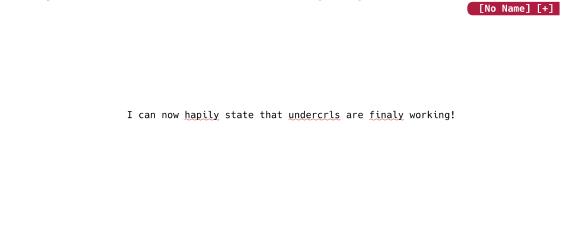
Enabling undercurls in tmux and Neovim was a rewarding experience. I plan to experiment with this new ability to apply subtle visually clues in different colors. Who knows how useful this can be. Below you can see a working example. Doesn’t it look great?
Posted on Jan 10, 2026